GenieFlow Deployment Guide
GenieFlow can be deployed in multiple ways depending on your environment and requirements:
- Local Development: Run GenieFlow directly on your laptop for development and testing
- Docker Swarm: Deploy to a multi-node Docker Swarm cluster for demo, UAT, and production environments
- Kubernetes: Enterprise-grade orchestration for large-scale deployments
This guide focuses on Docker Swarm deployment, which provides a good balance of simplicity and scalability for most use cases.
Running GenieFlow locally
For local development, see the Getting Started guide.
Docker Stack / Docker Swarm
What is Docker Swarm?
Docker Swarm is Docker's native clustering and orchestration solution. It allows you to create and manage a cluster of Docker nodes, providing:
- Service replication: Run multiple instances of services across nodes
- Load balancing: Automatically distribute requests across service replicas
- Rolling updates: Update services with zero downtime
- Service discovery: Services can communicate using service names
- Secrets management: Securely distribute configuration and credentials
GenieFlow Architecture Overview
A complete GenieFlow deployment consists of several interconnected services:
Core Services: - Frontend: Web UI built with Vite/React for user interactions - Agent API: REST API server handling chat requests and orchestration - Agent Workers: Background processors that execute AI workflows (scalable)
Required Supporting Services: - Redis: Message broker and caching layer for worker coordination
Other Supporting Services:
Depending on the agents and their invokers, you are likely in need of one or more of the following supporting services as well - Weaviate: Vector database for storing embeddings and semantic search - Text-to-Vector Transformers: ML service for generating embeddings. Of course, it might make sense to use externally running services for this. Such as a dedicated Ollama machine, or cloud native alternatives. - Tika: Document processing service for extracting text from files
Docker stack & deployment using docker swarm
The architecture shown in the diagram demonstrates a 3-node swarm setup with data persistence and load balancing across nodes. This is just an example of a setup.
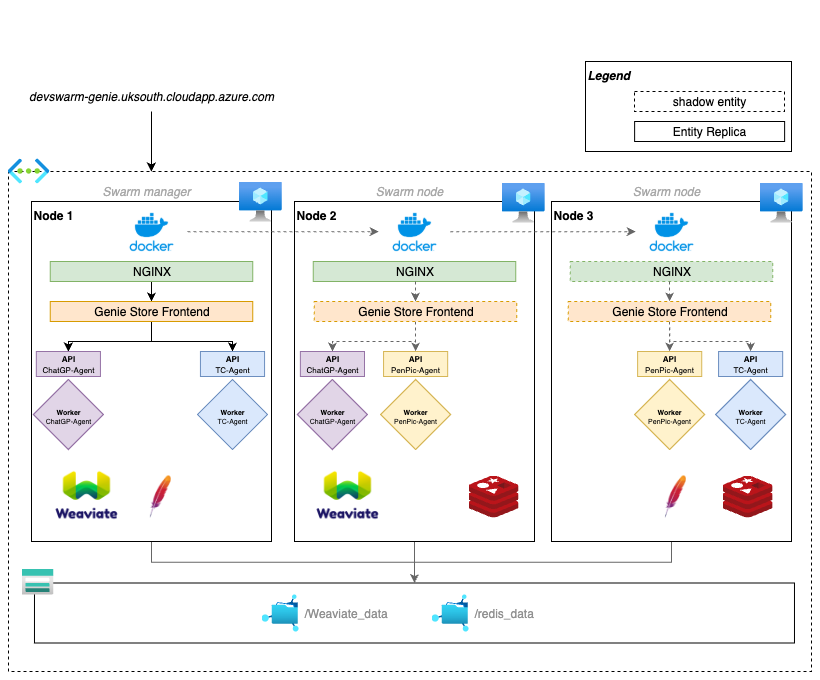
GenieFlow uses a multi-stack deployment approach where the frontend and backend are deployed as separate Docker stacks that communicate through shared networks. This separation allows for:
- Independent scaling: Frontend and backend can be scaled separately based on demand
- Independent updates: Deploy frontend or backend updates without affecting the other
- Resource isolation: Different resource constraints and placement rules per stack
- Network isolation: Clear separation of concerns while maintaining connectivity
Frontend Stack
The frontend stack contains only the web UI and connects to the backend services through the shared geniestore-net network.
Example of a docker-stack.yml for a genie frontend:
version: "3.5"

networks:
  geniestore-net:

services:
  frontend:
    image:
    hostname: agent.frontend.chatgpgenie
    networks:
      - geniestore-net
    environment:
      VITE_CHAT_MAX_POLL_ATTEMPTS: ${VITE_CHAT_MAX_POLL_ATTEMPTS}
      VITE_CHAT_MESSAGE_TIMEOUT: ${VITE_CHAT_MESSAGE_TIMEOUT}
    command:
      - "bun"
      - "run"
      - "build"
      - "&&"
      - "bun"
      - "run"
      - "preview"
      - "--host"
Backend Stack (GenieFlow Agent Services)
The backend stack contains all the AI processing services, databases, and supporting infrastructure. It defines the geniestore-net network that the frontend connects to, enabling communication between the stacks.
version: '3.5'

networks:
  controlmap-agent:
  geniestore-net:
    external: true
    name: chatgp-frontend_geniestore-net

services:
  agent-api:
    image:
    hostname: agent.api.controlmap
    command: ["make", "run-api"]
    depends_on:
      - weaviate
      - redis
    networks:
      - controlmap-agent
      - geniestore-net
    environment:
      AZURE_OPENAI_API_KEY: ${AZURE_OPENAI_API_KEY}
      AZURE_OPENAI_API_VERSION: ${AZURE_OPENAI_API_VERSION}
      AZURE_OPENAI_DEPLOYMENT_NAME: ${AZURE_OPENAI_DEPLOYMENT_NAME}
      AZURE_OPENAI_ENDPOINT: ${AZURE_OPENAI_ENDPOINT}
      TEXT_2_VEC_URL: ${TEXT_2_VEC_URL}
      TIKA_SERVICE_URL: ${TIKA_SERVICE_URL}
    configs:
      - source: agent_config
        target: /opt/genie-flow-agent/config.yaml

  agent-worker:
    image: XXX
    command: ["make", "run-worker"]
    networks:
      - controlmap-agent
    deploy:
      replicas: 3
    depends_on:
      - weaviate
      - redis
    environment:
      AZURE_OPENAI_API_KEY: ${AZURE_OPENAI_API_KEY}
      AZURE_OPENAI_API_VERSION: ${AZURE_OPENAI_API_VERSION}
      AZURE_OPENAI_DEPLOYMENT_NAME: ${AZURE_OPENAI_DEPLOYMENT_NAME}
      AZURE_OPENAI_ENDPOINT: ${AZURE_OPENAI_ENDPOINT}
      TEXT_2_VEC_URL: ${TEXT_2_VEC_URL}
      TIKA_SERVICE_URL: ${TIKA_SERVICE_URL}
    configs:
      - source: agent_config
        target: /opt/genie-flow-agent/config.yaml

  redis:
    image: redis/redis-stack:latest
    hostname: redis
    networks:
      - controlmap-agent
    volumes:
      - db-data:/data
    command: [
      "redis-server",
      "--appendonly",
      "yes",
      "--dir",
      "/data",
      "--protected-mode",
      "no"
    ]

  t2v-transformers:
    image: cr.weaviate.io/semitechnologies/transformers-inference:sentence-transformers-multi-qa-MiniLM-L6-cos-v1
    hostname: text2vec
    networks:
      - controlmap-agent
    environment:
      ENABLE_CUDA: 0

  tika:
    image: "apache/tika:2.9.0.0"
    hostname: tika
    networks:
      - controlmap-agent
    environment:
      - JAVA_TOOL_OPTIONS="-Xmx2G"

  weaviate:
    image: semitechnologies/weaviate:1.27.25
    hostname: weaviate
    volumes:
      - weav-data:/var/lib/weaviate
    networks:
      - controlmap-agent
    environment:
      QUERY_DEFAULTS_LIMIT: 25
      AUTHENTICATION_ANONYMOUS_ACCESS_ENABLED: 'true'
      PERSISTENCE_DATA_PATH: '/var/lib/weaviate'
      DEFAULT_VECTORIZER_MODULE: 'none'
      ENABLE_MODULES: text2vec-transformers
      TRANSFORMERS_INFERENCE_API: http://text2vec:8080
      CLUSTER_HOSTNAME: 'node1'

volumes:
  db-data:
  weav-data:

configs:
  agent_config:
    name: agent-${CONF_TIMESTAMP}.yaml
    file: ${AGENT_CONFIG}
Connecting the Stacks
The two stacks work together through:
- Shared Network: The
geniestore-netnetwork is created by the backend stack and marked asexternal: truein the frontend stack - Service Discovery: Frontend can reach backend services using their service names (e.g.,
agent-api) - Load Balancing: Docker Swarm automatically load balances requests across service replicas
- Data Persistence: Backend volumes (
db-data,weav-data) persist across deployments
Deployment Order: 1. Deploy the frontend stack first to create the shared network 2. Deploy the backend stack which connects to the existing network 3. Both stacks can then be updated independently
Getting Started - Manual Remote Deployment with Docker Context
For manual deployments or when GitLab CI is not available, you can deploy remotely using Docker contexts. This allows you to run Docker commands from your local machine against a remote swarm.
Setup Docker Context:
# Create a context for your remote swarm
docker context create remote-swarm \
  --docker "host=ssh://user@your-swarm-manager.com"

# Switch to the remote context
docker context use remote-swarm

# Verify connection
docker node ls
Deploy the Stack:
# Set required environment variables
export CONF_TIMESTAMP=$(date +%s)
export AGENT_CONFIG=./config/agent-config.yaml

# Deploy backend stack first
docker stack deploy --with-registry-auth -c docker-stack-backend.yml genie-backend

# Deploy frontend stack
docker stack deploy --with-registry-auth -c docker-stack-frontend.yml genie-frontend

# Check deployment status
docker service ls
docker stack services genie-backend
docker stack services genie-frontend
Switch back to local context:
docker context use default
This method gives you direct control over deployments and is useful for: - Manual deployments and testing - Environments without GitLab CI access - Troubleshooting deployment issues - One-off deployments
Automated Deployment Methods
Method 1: GitLab CI/CD Pipeline
This approach uses GitLab runners to automatically deploy your Docker stacks when specific tags are pushed. The runner executes deployment commands directly on the target swarm manager node.
Prerequisites: - GitLab runner configured on or with access to your Docker Swarm manager node - Docker registry access configured for the runner - Secure files configured in GitLab for sensitive configuration
Pipeline Configuration:
variables:
  DEPLOY_TO_NAME: demo
  DEPLOY_TO_URL: http://your.agent.frontend.url/
  DEPLOY_TO_PATTERN: '/.*\-demo$/'
  STACK_NAME: your_genie_name

.secure-files:
  before_script:
    # Make secure files available to this pipeline
    - apk add bash curl
    - curl -s https://gitlab.com/gitlab-org/incubation-engineering/mobile-devops/download-secure-files/-/raw/main/installer | bash
  script:
    - echo "Mounted secure files..."

deploy-to:
  stage: deploy
  environment:
    name: $DEPLOY_TO_NAME
    url: $DEPLOY_TO_URL
  rules:
    - if: $CI_COMMIT_TAG =~ $DEPLOY_TO_PATTERN
  script:
    # Login to the container registry
    - docker login -u gitlab-ci-token -p $CI_JOB_TOKEN $CI_REGISTRY
    # Deploy docker stack on current machine.
    - CONF_TIMESTAMP=$(date +%s) docker stack deploy --detach=true --with-registry-auth -c deployment/docker-stack.yml $STACK_NAME
How it works:
1. Tag-based Deployment: Pipeline triggers on git tags matching the pattern (e.g., v1.0-demo)
2. Secure Files: Downloads sensitive configuration files using GitLab's secure files feature
3. Registry Login: Authenticates with container registry using CI job token
4. Stack Deployment: Executes docker stack deploy command on the swarm manager
5. Environment Management: Creates GitLab environments for tracking deployments
Method 2: GitHub Actions Pipeline
This approach uses GitHub Actions to build container images and deploy them to your Docker Swarm. It's ideal for projects hosted on GitHub and provides tight integration with GitHub Container Registry (GHCR).
Prerequisites: - GitHub repository with Actions enabled - SSH access configured to your Docker Swarm manager node - GitHub secrets configured for deployment credentials - Container registry access (GitHub Container Registry recommended)
Key Features: - Automated Testing: Runs tests before deployment - Multi-stage Pipeline: Build, test, then deploy workflow - GitHub Container Registry: Native integration with GHCR for container storage - SSH Deployment: Uses SSH to deploy stacks on remote swarm nodes - Environment Files: Securely manages environment variables through GitHub secrets
Workflow Configuration:
name: release

on:
  push:
    branches:
      - "main"
    tags:
      - "*"

permissions:
  packages: write

jobs:
  run-tests:
    runs-on: ubuntu-latest
    steps:
      - name: Checkout repository
        uses: actions/checkout@v4
        with:
          ssh-key: ${{ secrets.ACCESS_TOKEN }}

  build-and-push-image:
    runs-on: ubuntu-latest
    needs:
      - run-tests
    steps:
      - name: Checkout repository
        uses: actions/checkout@v4
        with:
          ssh-key: ${{ secrets.ACCESS_TOKEN }}
      - name: Login to the container registry
        uses: docker/login-action@v3
        with:
          registry: https://ghcr.io
          username: ${{ github.actor }}
          password: ${{ secrets.GITHUB_TOKEN }}
      - name: Build and push docker image
        uses: docker/build-push-action@v6
        with:
          context: .
          build-args: |
            VERSION=${{ github.ref_name }}
          push: true
          tags: |
            your_genie_image_name:latest

  deploy-to-test:
    runs-on: ubuntu-latest
    needs:
      - build-and-push-image
    steps:
      - name: Checkout repository
        uses: actions/checkout@v4
        with:
          ssh-key: ${{ secrets.ACCESS_TOKEN }}

      - name: create env file
        run: |
          echo "ENVIRONMENT_VAR_1=${{ env.ENVIRONMENT_VAR_1 }}" >> ./envfile\
          echo "ENVIRONMENT_VAR_2=${{ env.ENVIRONMENT_VAR_2 }}" >> ./envfile\
          echo "ENVIRONMENT_VAR_3=${{ env.ENVIRONMENT_VAR_3 }}" >> ./envfile\

      - name: Docker Stack Deploy
        uses: cssnr/stack-deploy-action@v1.0.1
        with:
          name: your_genie_name
          file: deployments/compose.stack.yml
          host: url_of_machine
          user: deploy
          ssh_key: ${{ secrets.DEPLOY_PRIVATE_SSH_TOKEN }}
          env_file: ./envfile
          registry_host: https://ghcr.io
          registry_user: ${{ github.actor }}
          registry_pass: ${{ secrets.GITHUB_TOKEN }}
How it works:
1. Trigger on Push/Tag: Workflow runs on main branch pushes or tag creation
2. Run Tests: Executes test suite to ensure code quality before deployment
3. Build & Push: Builds Docker image and pushes to GitHub Container Registry
4. Environment Setup: Creates environment file from GitHub secrets
5. Stack Deploy: Uses SSH to deploy the Docker stack on remote swarm manager
6. Third-party Action: Leverages cssnr/stack-deploy-action for streamlined deployment
Required GitHub Secrets:
- ACCESS_TOKEN: SSH key for repository access
- DEPLOY_PRIVATE_SSH_TOKEN: SSH private key for swarm manager access
- Environment variables: ENVIRONMENT_VAR_1, ENVIRONMENT_VAR_2, etc.